

Appearance
How Are Projects Created and Managed?
The Projects module is the central workspace for creating, organizing, and managing battery characterization projects. Each project serves as an independent workspace that stores battery information, uploaded datasets, extracted equivalent circuit model (ECM) parameters, generated lookup tables, simulation configurations, and analysis results.
From the Projects module, users can create new projects, access existing projects, monitor project progress, and manage the complete battery characterization workflow.
Projects Dashboard
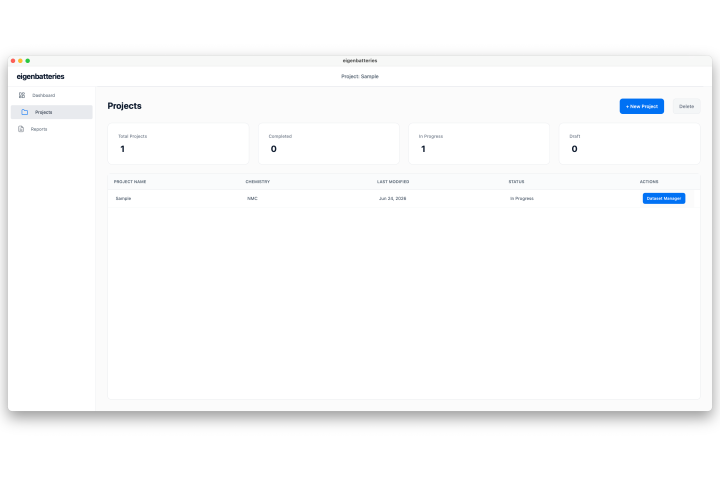
The Projects Dashboard provides an overview of all projects available within the software. It enables users to create new projects, access existing ones, monitor their progress, and perform project management operations.
The dashboard consists of three primary sections:
- Project Statistics
- Project List
- Project Actions
Project Statistics
The statistics cards provide a summary of the projects currently available in the software.
The available statistics include:
- Total Projects – Total number of projects available.
- Completed – Projects that have successfully completed the characterization workflow.
- In Progress – Projects that are currently being processed.
- Draft – Projects that have been created but are not yet configured.
Project List
The Project List displays all available projects together with their key information, including:
- Project Name
- Battery Chemistry
- Last Modified Date
- Current Status
- Available Actions
This information allows users to quickly locate and manage individual projects.
Creating a New Project
A new project is created from the Projects Dashboard.
To create a project:
- Open the Projects module.
- Click New Project.
The software opens the Project Creation page, where the battery information required for characterization and simulation is configured.
Project Information
The following information is required when creating a project:
- Project Name – A unique name used to identify the project.
- Battery Chemistry – The chemistry associated with the battery under analysis.
- Cell Count (Series) – Number of cells connected in series.
- Nominal Capacity – Rated battery capacity in ampere-hours (Ah).
The project may also include optional metadata such as cell voltage limits, pack voltage limits, and operating limits for documentation and future reference.
After verifying the entered information, click Next to create the project and proceed to the Dataset Upload stage.
Managing Existing Projects
The Projects module provides several operations for managing existing projects.
Users can:
- Open an existing project
- Rename a project
- Update uploaded datasets
- Modify column mappings
- Continue an incomplete characterization workflow
- Delete a project
Note: Deleting a project permanently removes all associated datasets, extracted parameters, simulation settings, and generated results.
Expected Outcome
After a project is created, it becomes available in the Projects Dashboard and serves as the workspace for the complete battery characterization workflow. From the project workspace, users can upload datasets, configure project settings, perform parameter extraction, generate lookup tables, execute simulations, estimate State of Charge (SOC), and review or export the generated results.